
The cash flow impact of optimizing the invoice process increase from billing efficiencies

Cash flow can make or break a business. For many field service providers, a significant barrier to achieving healthy cash flow lies in the time it takes to get paid for services rendered in the field.

This challenge is especially pronounced in industries like oilfield services, where customers and operators impose intricate and unique requirements for verifying work before releasing payment. These requirements can range from obtaining signatures, special stamps or coding on field tickets, to requiring invoice packages in which signed field or delivery tickets with images, all need to be separated and sorted according to the customers’ specifications and uploaded through designated portals.

The Challenges with Manual Billing

To meet customer demands, many oilfield service providers still perform the invoicing process manually, without fully realizing the impact this can have on cash flow and its ability to finance the growth of the Business. When the invoicing and billing process is automated, cash flow can increase significantly, without requiring any change in the customers’ payment behavior.

Let’s take a deeper dive into the challenges posed by manual billing and how automation can be a lifeboat to struggling businesses or a catalyst for growth.

Deciphering Handwritten Field Information

Field service providers often use handwritten field tickets describing the work performed in the field, the equipment used, the inventory consumed, the expenses incurred, and the labor hours expended. This information is often necessary for billing, equipment maintenance, etc. yet when handwritten, can be notoriously difficult to read. Translating them into an understandable format is not only time-consuming and an inefficient use of staff labor. It is also mistake prone, especially if field personnel are trying to assign the correct billing codes for the work performed, apply customer-specific pricing – all from memory.

Data Entry Issues

Once deciphered, the field data must be meticulously entered into internal ticketing or invoicing systems and those of their customers. This step alone can consume countless hours, especially when dealing with a high volume of transactions. As the company grows, the billing department grows with it. The risk of data entry errors looms large, potentially leading to invoicing discrepancies and customer disputes

We’ve seen clients with drawers stuffed with handwritten field tickets, waiting to be entered and invoiced. They had been set aside since more research and correction was needed before they could be sent to the customer. Some were over 2 months old.  When invoices are finally prepared (late) and billed to the customer, it’s not just cash flow that suffers, but also revenue since late invoices are more difficult to collect.

Cross-Referencing Complex Agreements

The complexity of customer agreements is another hurdle. Billing teams must cross-reference pricing and service agreements to ensure accurate invoicing. Any deviations from these agreements can lead to disputes and delayed payments.

Crafting Invoices from Excel or Word

Creating invoices with Word or Excel is also a labor-intensive process. After invoices are created, they must still be entered into the customer’s ticket and/or invoice systems, as well as into an internal accounting system to track accounts receivable, revenue, taxes, aging and payments. This manual approach not only increases the risk of errors but also consumes valuable time unnecessarily.

Uploading to Customer Portals

Many customers and operators insist on invoices being uploaded to their designated portals. This requirement necessitates extra steps, often involving additional data entry and document management. Failing to meet these portal requirements can result in payment delays and customers frustrated for not having timely information on the work performed at their sites.

Hand resting on a laptop that is on a wooden surface with a document on the screen with the word “invoice” on the center of the page.

The Promise of Automation

Thankfully, for most oilfield service providers, a solution lies in automating the field ticket and invoice preparation and delivery/billing process. Despite skepticism from some quarters about the material impact of automation, or concerns about the complexity of their billing processes, the reality is that software available today can automate most billing processes to the point of removing days or weeks out of this process.  

CBSi’s ofsERP® extension for Microsoft Dynamics 365 Business Central Essentials has demonstrated remarkable success in automating billing processes, from the simplest to the most intricate.

Real-world results:

The CFO of an oilfield services client referred to the results of our invoice automation preparing custom invoicing packages meeting the needs of his large clients a “Game-changer!” as his company grew from ~$18m to ~$100m in revenue, without a corresponding increase in his billing department.

Another OFS client told us that the number of days they were able to shave off the invoicing process (1) increased cash flow in the 1st 12 months by an amount far exceeding the total investment with us in software licensing, data migration, and implementation, and (2) enabled him to confidently reduce his line of credit, saving ~$200,000 in annual interest expense.

Reduced Operational Costs

One of the immediate financial benefits of automation is a reduction in operational costs. With manual processes, you often need a larger billing team to handle the workload as you grow. Automation streamlines tasks, allowing you to allocate resources more efficiently and trim unnecessary overhead expenses.

Faster Payment Collection

Automation accelerates the entire invoicing and billing processes in scenarios in which the terms of a sale are based on Net terms (not prepaid, or contractually defined otherwise). Invoices can be generated quickly and accurately from electronic field tickets, delivery tickets, or other sources, and can often reach your customers with an invoice date days or weeks earlier than with the manual process.

In this example, field service work is performed on payment terms of Net 30 days after the invoice date, for a customer who typically pays 10 days late, 40 days after the invoice date. If you can honestly and ethically generate a proper invoice dated 15 days earlier, then you will be paid 15 days earlier (all other variables remain the same). The customer can continue to pay 10 days late, 40 days after the date of the invoice, but he will be paying 15 days earlier than he paid previously.

I say “honestly, ethically, and according to financial accounting standards” because we’re not suggesting or condoning pre-dating invoices before performing the work or before delivering equipment to the field. The key principle refers to reducing the number of days it takes after the work has been performed and/or product delivered to gather the information needed to prepare a proper invoice, receive internal and external approvals, and place it into the “hands” of your customer.

Observe from the above example, that both the actual terms of each customer, and the # of days he pays late (or early) has no impact on our ability to get the invoices created and, in his hands, sooner. The actual terms of the customer could be Net 10,5,20, or any net terms, and, as long as they remain unchanged, they do not affect cash flow.

Fewer Billing Disputes

The accuracy and consistency offered by automation means fewer billing disputes. When your invoices align precisely with customer agreements and expectations, there are fewer reasons for customers to dispute charges. This leads to smoother transactions and fewer delays in delivering a proper invoice into the customer’s hands (or designated portal).

Less Management Time Spent on the Invoice Approval Process

Automation frees up your team’s time and energy, allowing them to focus on strategic activities that drive growth and innovation. Management at various approval levels no longer must spend hours, pouring through invoices to validate coding, pricing, calculations, missing bill lines, etc. With fewer hours spent on these tasks, they can engage in more value-added tasks, ultimately enhancing your competitive edge.

Proving the Cash Flow Impact

First, we’ll prove that shaving days off this process leads to a tangible increase in cash on hand, by examining changes in the Accounts Receivable balance, provided other factors remain unchanged.

Next, we will provide a shortcut calculation that results in the same change in cash on hand.

Imagine a scenario where you reduce the processing time for invoices by 15 days, while keeping all other variables constant. This common reduction period, especially in the oilfield service industry, consistently results in a remarkable boost to cash flow.

Figures 1 and 2 serve as our guides, utilizing a fictitious company with $30,000,000 in annual sales, of which $28,000,000 is sold on net terms. Both figures illustrate three scenarios: reducing the invoice preparation and delivery process by 5, 15, and 25 days.

Figure 1: Proof of Cash Flow Impact by Change in A/R

ree

Figure 1 illustrates that in an environment where the time to prepare and deliver a proper invoice can be reduced by 15 days (typical in the oilfield service industry), the Accounts Receivable balance decreases from $5,000,000 to $3,849,315, a credit of $1,150,685. To maintain financial balance, this credit (reduction to Accounts Receivable) needs an offsetting debit of $1,150,685 which can only reasonably be the asset, cash on hand.

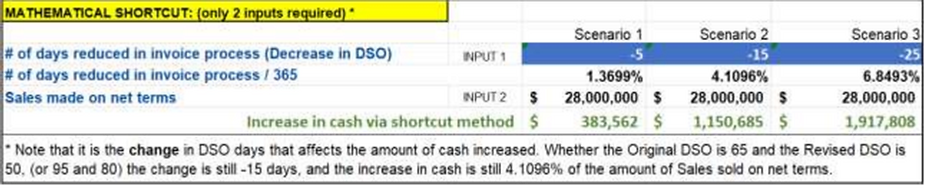
Figure 2: Shortcut Formula with the same results
ree

Figure 2 unveils a convenient shortcut—a mathematical formula that simplifies the process of calculating the increase in cash flow resulting from automation. What’s remarkable about this formula is that it doesn’t require the intricacies of Accounts Receivable balances. Instead, it requires only 2 variables to calculate the increase in cash on hand: 1) the # of days reduced in the invoicing process, and 2) the dollar amount of annual sales sold on net terms.

The Numbers Speak Volumes

This underscores a fundamental principle – that the increase in cash is indeed substantial when the invoicing process is optimized, and  that cash flow is increased for each day you can shave off the invoicing process.

As illustrated, a 15-day reduction translates to an approximate 4.11% increase in cash flow, calculated as a percentage of sales made on net terms. Simply put, for every dollar of sales conducted on net terms, a 15-day reduction equates to a 4.11% surge in cash flow. It’s not just a marginal improvement; it’s a substantial financial transformation.

But the beauty of this principle lies in its adaptability. Whether you’re considering a 5-day reduction, which still yields a notable 1.37% increase, or an ambitious 25-day reduction, leading to a remarkable 6.85% cash flow boost, the message remains clear—Invoicing and billing automation has a tangible and direct positive impact on cash flow, and the amount can be calculated in advance.

It’s not just about cash flow; it’s about securing financial stability and positioning the company for growth in a highly competitive industry.

Unlocking Your Full Potential

The key to unlocking your full potential goes well beyond efficiently automating the invoice creation and billing process to increase cash flow, it involves optimizing all financial and operational processes companywide.

A lock surrounded by piles of coins.

By embracing automation, businesses can experience significant increases in performance, growth, and market share.

With real-time access to financial and operational data, you can make informed decisions, allocate resources effectively, and seize opportunities with confidence.

Using Microsoft Dynamics 365 Business Central provides these results, and can also protect your business from internal threats. Hosting directly by Microsoft, provides significant protection against external threats. IT infrastructure costs are reduced to near zero, as access to the entire business application and all related data is fully available in the cloud with an internet enabled phone, laptop, or tablet.

Automation empowers you to optimize your operations, streamline your processes, and gain a competitive edge in a challenging landscape. It’s not just about staying current with industry trends; it’s about taking charge of your financial destiny.

It’s a strategic move that positions you for long-term success and growth.

Transform your entire field service business one step at a time. Take the first step by contacting us today.

(972) 612-1122 info@cbsi-corp.com

Posted in ERP

What Is ofsERP® — And Why Oilfield Service Companies Are Switching to It

If you’re running an oilfield service company today, you’re probably managing more moving parts than your current software was ever designed to handle.

Field tickets that don’t connect to invoicing. Equipment tracked on spreadsheets. Rental orders living in one system, financials in another. The data exists — but getting it to work together is another problem entirely.

What is ofsERP®? That’s where ofsERP®, built on Microsoft Dynamics 365 Business Central, starts to make a measurable difference.

What ofsERP® Actually Does

At a practical level, ofsERP® is an ERP built specifically for oilfield service companies — not adapted from a generic platform, but purpose-built for the way oilfield operations actually work.

It replaces the disconnected tools most oilfield companies are piecing together — field service apps, rental tracking, equipment logs, billing software — with one unified system running on Microsoft Business Central.

Field tickets, equipment asset management, rental orders, job costing, invoicing, and financials all operate in the same environment. No separate integration required.

Where Oilfield Companies Start to Feel the Strain

The inefficiencies rarely show up all at once. They build over time, and usually in the same places.

Billing Delays After Job Completion

When field data doesn’t connect directly to invoicing, there’s always a lag. Someone has to manually transfer information, verify it, and push it through. The gap between job completion and invoice delivery costs real money.

Equipment Visibility Gaps

Knowing where your equipment is, whether it’s available, and how well it’s being utilized requires real-time data. Without it, utilization suffers and scheduling becomes guesswork.

Multiple Systems That Don’t Talk to Each Other

When field crews, the office team, and accounting are working from different tools, errors compound. Reconciling those discrepancies takes time that could be spent elsewhere.

How ofsERP® Addresses These Gaps

This is where the design of ofsERP® stands out from generic ERP solutions.

Most field service ERP platforms are built around servicing a customer’s equipment. ofsERP® is built around a different reality — oilfield service companies use their own equipment to provide services at a job site or well. The focus is on tracking, renting, and maintaining their own assets, not a customer’s.

Rather than using Business Central’s native Service Management module — which requires a Premium license and was designed for a different use case — ofsERP® uses Business Central’s existing Sales Order tables with different order types for Sale, Service, Rental, and Repair orders. This approach keeps things simpler, requires only an Essentials BC license, and delivers more flexibility for oilfield workflows.

Field crews can capture time, materials, equipment usage, photos, and signatures in real time. That data flows directly to accounting and project management — eliminating the gap between what happens in the field and what gets billed.

The Operational Impact

Consider what happens when billing cycles tighten.

When field ticket data connects directly to invoicing, the delay between job completion and invoice delivery shrinks significantly. For oilfield service companies running high job volumes, that compression in the billing cycle directly improves cash flow.

The same applies to equipment utilization. When location, availability, and usage data are visible in one system, scheduling becomes more precise and underutilized assets are easier to identify and redeploy.

These aren’t abstract efficiency gains. They show up in real numbers — faster invoicing, better utilization rates, fewer hours spent reconciling data across systems.

Built for Companies at Any Stage of Growth

ofsERP® is currently used by companies with 5 to 400 users.

The platform is designed to scale as your operation grows — whether you’re managing a few crews or running a multi-division oilfield service company with complex financial workflows. Because it’s built as an extension of Business Central rather than a modification of it, it receives Microsoft updates without interruption and doesn’t require a platform change as your needs evolve.

CBSi brings over 17 years of oilfield ERP implementation experience and more than 30 years of combined expertise in Microsoft Dynamics NAV and Business Central. That background matters when you’re setting up a system that has to work correctly from day one.

A Different Approach to ERP for Oilfield

Most ERP implementations feel like fitting your business into someone else’s template.

ofsERP® was designed the other way around — starting from how oilfield service companies actually operate and building the system to match. The result is a platform that handles the full scope of oilfield service operations without the workarounds, patchwork integrations, or licensing overhead that comes with trying to adapt a generic solution.

If your current setup is creating more friction than it’s removing, that’s worth looking at sooner rather than later. The right ERP doesn’t just store your data — it helps you act on it faster, bill more accurately, and run a tighter operation across every line of business.

Ready to Take Your Oilfield Business to the Next Level?

The key is to start with what matters most to your business today, apply it consistently, and build from there. If you’re ready to take your oilfield business to the next level, call 800-455-5915 or schedule a call!

Posted in ERP

Cloud ERP vs On-Premise ERP: Which Is Right for Oilfield Service Companies?

When oilfield service companies start evaluating ERP systems, one of the first decisions they face has nothing to do with features or functionality. It has to do with where the system lives and how it is managed.

Cloud ERP and on-premise ERP represent two fundamentally different approaches to running your business software. Both have real advantages. Both come with trade-offs. And for oilfield service companies specifically, the choice has implications that go beyond IT infrastructure and into how your operation runs day to day.

This is an honest comparison of both options, and a straightforward look at why most oilfield service companies today are moving toward cloud-based ERP.

What Is On-Premise ERP?

On-premise ERP means the software is installed and runs on servers that your company owns and manages, either at your own facility or through a third-party data center you control.

Your IT team is responsible for maintaining the hardware, managing security, applying updates, and ensuring the system stays operational. Everything lives inside your own infrastructure.

For many years, on-premise was the only option. Companies built their operations around it, and for some businesses in specific situations, it still makes sense today.

Where On-Premise Works

On-premise ERP can be a reasonable choice when a company has strict data sovereignty requirements that prevent information from being stored outside their own infrastructure. It can also work for organizations that have a large, experienced internal IT team already managing complex systems, or for businesses operating in locations where reliable internet connectivity is not consistently available.

In those specific circumstances, the control that on-premise provides has real value.

Where On-Premise Falls Short

Outside of those specific situations, on-premise ERP introduces costs and constraints that most growing oilfield service companies are not well positioned to manage.

Hardware is expensive to purchase, maintain, and eventually replace. Security is your team’s responsibility, which means your exposure to risk grows alongside your obligation to manage it. Updates and upgrades require internal resources to plan and execute, which often means companies fall behind on versions and miss improvements the software vendor has already built.

Scaling an on-premise system as your business grows typically means additional hardware investment and IT overhead. And if something goes wrong at the server level, recovery depends entirely on your internal capabilities and backup infrastructure.

For a business focused on running oilfield operations, managing all of that is a significant distraction from the actual work of the company.

What Is Cloud ERP?

Cloud ERP means the software runs on servers managed by the software vendor or a trusted hosting partner, and is accessed through the internet. Your team uses the system from any device, in any location, without needing to manage the underlying infrastructure.

Updates happen automatically. Security is managed at the platform level. Scaling is handled by the cloud infrastructure rather than your IT budget. And because the system is accessible from anywhere with an internet connection, your team in the field and your team in the office are working from the same data in real time.

Where Cloud ERP Wins for Oilfield

For oilfield service companies, the advantages of cloud ERP are directly aligned with how the business actually operates.

Field accessibility. Your crews are not in an office. They are at well sites, job locations, and remote facilities. Cloud ERP means field data can be captured in real time, from the field, and flow immediately into billing and operations without anyone having to physically return to the office or transfer information manually.

Lower total cost of ownership. Without the hardware investment, internal IT overhead, and ongoing maintenance costs associated with on-premise systems, cloud ERP typically delivers a lower total cost over time. You pay a predictable subscription rather than absorbing unpredictable capital and operational expenses.

Automatic updates. When the software vendor releases improvements, your system gets them without requiring internal planning, resources, or downtime. Your ERP stays current without additional effort on your part.

Scalability without capital investment. As your oilfield operation grows, adding users and capacity in a cloud environment does not require new hardware purchases. The infrastructure scales with your business at a fraction of the cost of expanding an on-premise system.

Business continuity and reliability. Cloud platforms maintained by enterprise-grade vendors like Microsoft operate with redundancy and disaster recovery built in. If something goes wrong at the infrastructure level, it is the vendor’s responsibility to resolve it, not yours.

Where Cloud ERP Has Limitations

Cloud ERP does depend on a reliable internet connection. For oilfield companies operating in very remote locations where connectivity is limited or inconsistent, this is a real consideration.

It is also worth noting that in a cloud environment, your data is stored on the vendor’s infrastructure rather than your own. For most businesses, the security standards maintained by enterprise cloud providers far exceed what they could achieve with internal infrastructure. But for companies with specific regulatory or contractual data requirements, this is worth evaluating carefully before making a decision.

How ofsERP® Approaches This Decision

ofsERP®, built on Microsoft Dynamics 365 Business Central, is designed to run in the cloud by default, and for good reason.

Microsoft’s cloud infrastructure is among the most secure, reliable, and widely trusted in the world. Business Central is a cloud-first platform, which means it receives continuous improvements, security updates, and new capabilities through Microsoft’s regular release cycles. Companies running ofsERP® on Business Central benefit from that investment without having to manage it themselves.

For oilfield service companies that have specific reasons to keep their system on-premise or prefer a hybrid approach, CBSi also offers hosting on Microsoft Azure. That means your data stays within a controlled, enterprise-grade environment while still giving your team cloud-level accessibility and CBSi’s management expertise handling the infrastructure.

This flexibility matters because not every oilfield company is in the same situation. CBSi’s approach is to match the deployment model to your actual business requirements rather than applying a one-size-fits-all recommendation.

The Real Question Is Not Cloud vs On-Premise

Most oilfield service companies that spend time comparing cloud and on-premise ERP eventually realize the deployment model is not the most important question. The more important questions are whether the system was built for oilfield operations, whether the implementation partner understands your industry, and whether the platform can support your business as it grows.

A cloud-based generic ERP still will not handle field tickets, equipment rental, and oilfield job costing the way your operation requires. And an on-premise system built for oilfield will still carry the infrastructure and maintenance burden that diverts resources from your core business.

The companies that get the most out of their ERP investment are the ones that start with the right platform for their industry and choose the deployment model that fits their operational reality, rather than making the deployment decision first and then trying to find software that fits around it.

ofsERP® is purpose-built for oilfield service companies and runs on the most trusted cloud infrastructure available. CBSi brings over 17 years of oilfield ERP implementation experience and more than 30 years of combined expertise in Microsoft Dynamics NAV and Business Central to every implementation it supports.

Whether you are evaluating cloud ERP for the first time, reconsidering an existing on-premise system, or trying to understand which approach makes the most sense for your specific operation, that conversation is worth having with people who understand both the technology and the industry it is serving.

You can learn more about why companies choose CBSi and explore the full range of ERP services CBSi offers, from assessment and implementation to training and ongoing support. The ofsERP® FAQ is also a useful resource if you have specific questions about how the platform handles oilfield workflows and deployment options.

Ready to Take Your Oilfield Business to the Next Level?

The key is to start with what matters most to your business today, apply it consistently, and build from there. If you are ready to take your oilfield business to the next level, call 800-455-5915 or schedule a call!

Posted in ERP

Our ERP Experts are Happy to Help

Assessment | Implementation/Migration | Support

Contact Form

This field is for validation purposes and should be left unchanged.
Name(Required)
Company Email Required